HomeKit devices missing in third-party apps
This is not a bug - it’s a permanent limitation set by Apple. This article explains what to expect and what you can fix yourself in seconds.
Seeing devices in Apple’s Home app but not in Controller for HomeKit or another third-party app? There are usually two reasons.
Not every device type is available to developers
Apple keeps some device categories out of reach for third-party apps. Speakers and routers are fully off-limits. Features like Shortcuts, Adaptive Lighting, HomeKit Secure Video and native HomeKit notifications also stay exclusive to Apple’s own apps.
For notifications, Controller built its own solution that goes well beyond what Apple offers by default. See advanced notifications.
"Home Data" permission not granted
If devices could appear in third-party apps in principle but still don’t, the permission is usually the reason.
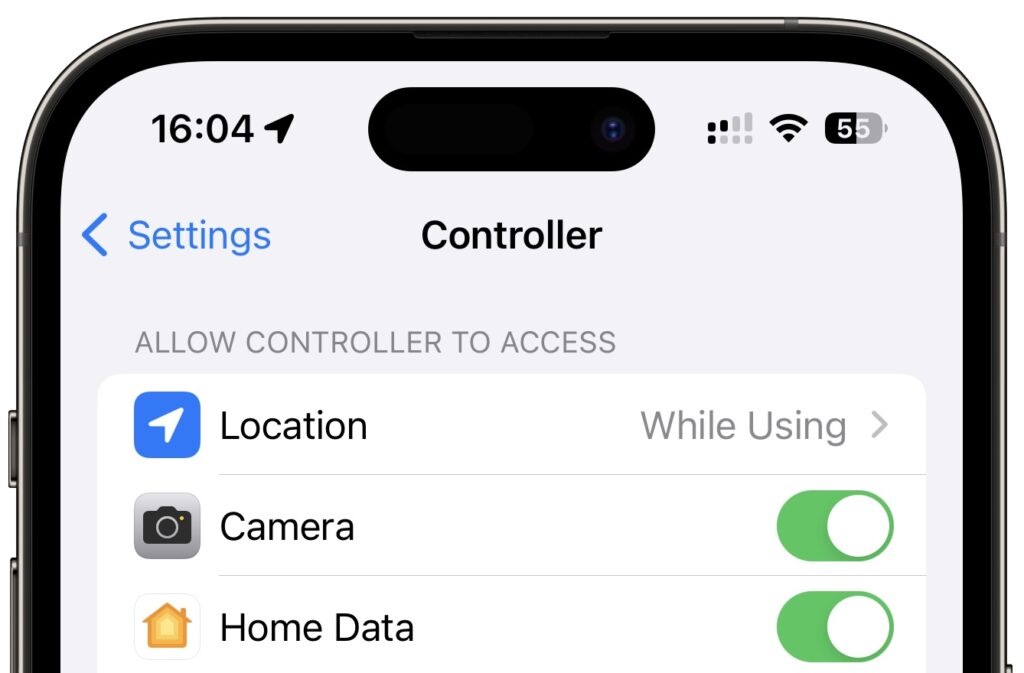
On first launch, the app asks for access to your Home data. If you declined or skipped that dialog, you can re-enable the permission in iOS Settings:
How to enable Home Data for Controller
- Open the iOS Settings app.
- Scroll to Controller for HomeKit in the list of apps and tap it.
- Turn on the Home Data switch.
- Reopen Controller - every allowed device now shows up.
If devices are still missing, check whether the type is even available to third-party apps (see above). Anything else is a real bug - in that case, drop us a short message.